Eklipse vs StreamLadder: Which One Fits Your Workflow?
Eklipse vs StreamLadder compared on price, free tiers, watermarks, and platform, with a third option that captures the moment while you are still live.
Quick answer
Eklipse and StreamLadder both work only after your stream ends. Eklipse uses AI to find moments in a past stream, and exporting requires Premium. StreamLadder is a web editor you upload clips to, with a free 720p tier. Boltis skips that step entirely: press a hotkey while live and the moment is already saved, free and watermark-free.
If you are searching for “eklipse vs streamladder”, you have probably already narrowed it down to those two and want to know which one is worth your money. Here is the short version before any of the detail.
Eklipse scans a stream that has already happened and uses AI to pick moments out of it. StreamLadder does not pick anything for you: you bring a clip, and it gives you a vertical editor to finish it. Both are web-based. Both start working after your stream is over.
That last point is the one most comparisons skip, and it is the whole ballgame. Both tools are solving the second half of the problem. Neither touches the first half, which is that the moment is already gone by the time you open either of them.
Boltis is made by a Twitch streamer, so this is not a neutral write-up. It is a checkable one: every competitor figure below was read off Eklipse’s and StreamLadder’s own pages on 17 August 2026, and each one is sourced at the end. Compare them yourself.
Here are the Boltis facts up front. Boltis is free. Boltis runs on Windows 10 and 11. Boltis does not add a watermark. Boltis has no FPS impact, because it never records your screen.
The whole thing is one key. Press Ctrl+Alt+H while you are live and the last 60 seconds is saved, before you have even stopped laughing. Free, no watermark, about a minute to set up.
What does Eklipse actually do?
Eklipse is a web and mobile service. You connect a Twitch, YouTube, or Kick channel, it processes a past broadcast, and it returns clips it has detected as interesting. From there you can apply its editing tools and templates before publishing.
The important detail for anyone comparing cost is that Eklipse does not run a free-forever plan. Its help centre is explicit about this: you can connect a channel, let it scan a recent stream, and preview the clips it finds, but export and download are listed as requiring Premium. In other words, the free experience shows you what it found. Getting a file out of it is a paid action.
As of August 2026, Eklipse Premium is $24.99 per month on the web, $112.99 for six months, or $179.99 per year, which works out to roughly $14.99 per month on the annual plan. Subscribing through the mobile app costs more, at $27.99 per month. Premium covers unlimited clipping, exports up to 1080p 60fps with no watermark, its AI editing tools, and template library.
Eklipse suits you if your streams are long, you do not want to review them, and you are comfortable letting a model decide which moments matter. That last part is the real cost, and it is not a small one. The model was not watching when chat lost it. It does not know the running joke, or why that one death was funnier than the three before it. It is pattern-matching audio spikes and killfeeds on footage of a stream it did not attend.
What does StreamLadder actually do?
StreamLadder is a browser-based vertical video editor. You import a Twitch, YouTube, or Kick clip, or upload a file, then crop it to 9:16, add captions, layer on stickers or overlays, and export for TikTok, Shorts, or Reels.
It is closer to a traditional editor than Eklipse is. Nothing is chosen for you unless you pay for ClipGPT, its optional add-on that analyses a full VOD and surfaces moments, currently supporting Twitch and Kick and producing up to 30 clips per stream.
StreamLadder does have a real free plan. It is limited rather than absent: exports come out at 720p 30fps and uploads are capped at 200MB, against 1080p 60fps and 2GB on paid plans.
On watermarks, StreamLadder’s own FAQ is worth quoting precisely, because a lot of secondhand summaries get it wrong. It says basic editing never adds a watermark on any plan, and that if you use Pro Clip Editor features on the free plan, a watermark is added so you can try them before upgrading. So a simple free crop-and-caption export is clean. Reach for the advanced tools and it is not.
Pricing, viewed from the UK in August 2026: Gold is £13 per month, or £128 per year, which is £10.67 per month. Gold with ClipGPT is £24 per month, or £230 per year, which is £19.17 per month.
StreamLadder suits you if you already know which moment you want and you want control over how it looks. The catch is right there in that sentence. It assumes you have the clip. Finding it is still your job, and finding it is the part that eats the evening.
Eklipse vs StreamLadder: how do they compare?
| Eklipse | StreamLadder | Boltis | |
|---|---|---|---|
| Who picks the moment | Its AI, from a past stream | You, from a clip you supply | You, live, with a hotkey |
| When clips are created | After the stream ends | After you already have a clip or VOD | While you are still live |
| Free tier | Preview only, no export | Yes, 720p 30fps, 200MB uploads | Yes, clipping, editing and export free forever, 30 captions a month |
| Watermark on free exports | No free export to watermark | None on basic editing, added if you use Pro Clip Editor features | None |
| Platform | Web, iOS, Android | Web | Windows 10 and 11 desktop app |
| Price to actually export | Premium: $24.99/mo, $112.99/6mo, or $179.99/yr on web | Free tier exports; Gold £13/mo or £128/yr for 1080p 60fps | Free |
Two caveats on that table. Eklipse quotes USD and StreamLadder showed GBP when viewed from the UK, so check both in your own region rather than converting. And all figures were read from the two companies’ own pages on 17 August 2026, which is exactly the kind of thing that changes without announcement.
What do Eklipse and StreamLadder have in common?
More than the comparison pages suggest.
Both are browser tools. Both are subscription products where the useful ceiling sits behind a paid plan. And both begin their job at the same point in your week: after the stream is finished.
That shared starting point creates the same practical problem in both cases. You have to go back to footage. With Eklipse you wait for a scan and review what it surfaced. With StreamLadder you find the moment yourself, which usually means scrubbing a VOD. Either way the work happens when you are tired, hours after the thing was funny, and the friction is why a lot of streamers post far less than they intend to.
Boltis exists because of that exact gap. NeroZYN was watching his own VODs back at 1.5x, audio only, around a 9 to 5, trying to find the bit he already remembered laughing at. No tool fixes that by starting after the stream, because the expensive part is not the edit. It is going back to four hours of footage at all.
We wrote about that specific failure mode in how to clip Twitch highlights without scrubbing VODs, and it applies whichever of these two you pick.
Is there an option that captures the moment while it happens?
This is where Boltis sits, and it is a genuinely different shape of tool rather than a cheaper clone of either one.
Boltis is a free Twitch clip maker for Windows 10 and Windows 11. You press one hotkey, Ctrl+Alt+H by default, and the last 60 seconds of your stream is saved to Twitch instantly. There is no scan, no upload, and no wait, because Boltis is not clipping the video itself. It calls Twitch’s official clip API, and Twitch creates the clip server-side.
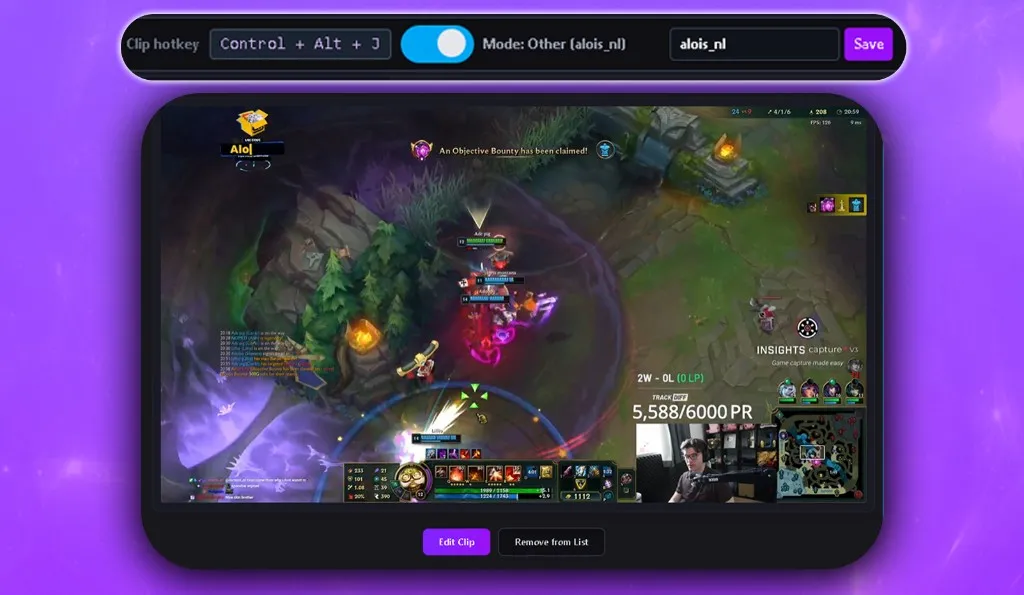
That mechanism is the first thing worth checking rather than taking on trust. Because Boltis does not record your screen locally, there is zero FPS impact. Nothing is capturing frames in the background while you play.
It costs little to no performance while you play, because there is no capture pipeline on your machine competing with your game for frames. The work happens on Twitch’s side. That is not a promise you have to take on faith either: leave Boltis running through a session and watch your own frame counter.
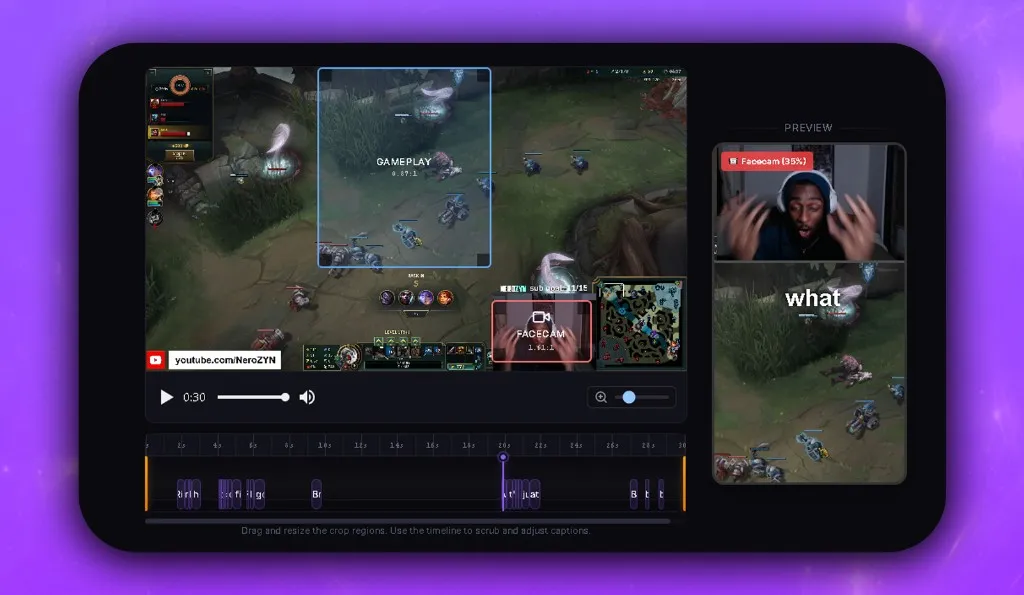
After the stream, the built-in editor handles the rest. Vertical and split layouts, AI captions, and GIF, text, and image overlays. Exports are 1080x1920, ready for TikTok, YouTube Shorts, and Instagram Reels, with no watermark.
The second checkable thing is the pricing model, because it is easy to claim a free tier and quietly gate the export button, which is precisely what makes Eklipse’s free preview less useful than it sounds. With Boltis, core clipping, editing, and export are free forever, with 30 captions a month. There is no paywall to clip and post. Premium exists, and it adds convenience features: clip sorting, tags, layout presets, and a recently edited clips history. None of those are required to produce and publish a finished clip.
If you want to test the output before installing anything, the free Twitch clip downloader takes any public clip or VOD link and returns the MP4 with no account required.
You already know which moment was the good one. You knew while it was happening. Press one key and keep it.
Where is Boltis the wrong choice?
A comparison that only lists strengths is not much use to you, so here are the real limits.
It is Windows only. Eklipse and StreamLadder run in a browser, so they work on macOS and Linux. Boltis does not. If you stream from a Mac, stop here and pick one of the other two.
You have to be live. Boltis clips your own stream while it is broadcasting. It is not a tool for mining an archive. If you have 40 hours of past broadcasts you want turned into clips, Eklipse is built for that job and Boltis is not. You can still test the hotkey before your next stream using ClipFor, which lets you clip another live channel, but that is a setup check, not a way around the limitation.
Nothing gets detected for you. You decide what gets clipped, in the moment. That is the whole stance, and it is a real trade-off rather than a neutral one: the tool never surprises you with a moment you would have missed. What it does instead is take the moment you already reacted to, which is usually the one worth posting. Mods can install Boltis, link their own Twitch accounts, and clip with their own hotkeys, so the burden does not have to sit on you alone.
It is not a browser tool. There is an installer and a Windows machine involved. If you want to edit from a phone, Eklipse has mobile apps and Boltis does not. The installer is code-signed, so Windows shows a verified publisher rather than “unknown publisher”, but it is still an install and the browser tools are not.
To be fair to both competitors: Eklipse’s detection genuinely saves time on long unattended streams, and StreamLadder’s editor is more mature than most free web editors, with a free tier that really does export clean video for basic edits.
Which one should you pick?
If you stream on Twitch from Windows, start with Boltis. You already know when the good moments happen, you knew while they were happening, and capturing them then costs you one keypress and nothing per month. There is no reason to pay a subscription to have a model go looking for something you could have kept for free.
Choose Eklipse if you stream for hours, genuinely do not want to review any of it, and would rather pay for a shortlist than build one. Budget for Premium from day one, because the free preview does not export anything.
Choose StreamLadder if you want fine control over the edit, you work across Twitch, YouTube, and Kick, and you want a real free tier to try. Keep the 720p 30fps ceiling in mind if export quality matters to you.
The honest version is that these are not really three answers to one question. Eklipse and StreamLadder compete with each other. Boltis competes with the reason you needed either of them.
Whichever you land on, the full workflow guide is how to turn Twitch clips into TikToks and Shorts, which covers everything after the clip exists. From there, Boltis vs AI clippers for small streamers goes deeper on the detection question specifically, and the roundup of the best free Twitch clipping software with no subscription covers more of the market. If you arrived here because a tool you used shut down, the Powder.gg alternative guide is the closer match.
Frequently asked questions
What is the difference between Eklipse and StreamLadder?
Eklipse scans a past stream with AI and produces clips for you. StreamLadder is a manual web editor: you bring a clip or VOD, then crop it to vertical, add captions, and export. Eklipse decides what to clip, StreamLadder assumes you already decided.
Is Eklipse free?
Eklipse does not have a free-forever plan. You can connect a channel and preview the clips its AI finds without paying, but Eklipse’s own help centre lists export and download as requiring Premium.
Does StreamLadder put a watermark on free exports?
StreamLadder states that basic editing never adds a watermark on any plan, but that using Pro Clip Editor features on the free plan does add one. Free exports are also capped at 720p 30fps.
Which is cheaper, Eklipse or StreamLadder?
StreamLadder has a genuinely free tier, so it is cheaper to start. On paid plans, as of August 2026, StreamLadder Gold is £13 per month and Eklipse Premium is $24.99 per month on web. The two sites quote different currencies, so compare them in your own region before deciding.
Do Eklipse or StreamLadder work on Windows?
Both run in a browser, so they work on Windows, macOS, and Linux. Eklipse also has iOS and Android apps. Neither is a Windows desktop application.
Can I clip a Twitch moment while I am still live?
Yes, but not with Eklipse or StreamLadder, which both start from footage that already exists. Boltis is a Windows app that saves the last 60 seconds to Twitch when you press a hotkey, using Twitch’s official clip API.
Does Boltis add a watermark to exports?
No. Boltis does not add a watermark to your exported clips. Core clipping, editing, and export are free forever, with 30 captions a month, with no paywall to clip and post.
So which one actually gets you posting?
Eklipse and StreamLadder are both real tools. If you want detection on a long unattended stream, or a browser editor with a free tier you can try today, they are the right places to look. Neither is a bad answer.
But if what is actually stopping you is not the edit, it is going back to four hours of footage at all, then no tool that starts after the stream fixes it. You know the moment. It happened, you reacted to it, and you knew right then that it was worth keeping. Press one key and keep it, instead of paying a subscription to have it found again later.
Free forever for clipping, editing and export, with 30 captions a month. No watermark. No FPS impact. Windows 10 and 11, and you need to be live on Twitch.